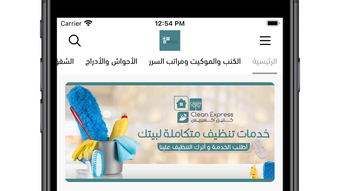

Clean Express: Your On-Demand Cleaning Assistant
Overview
Clean Express is a lifestyle-focused mobile application designed for iPhone users seeking efficient and convenient access to cleaning services. The app serves as a centralized platform for booking and managing cleaning appointments across various environments, including homes, offices, and other personal or professional spaces. Its primary purpose is to simplify the process of finding, scheduling, and tracking cleaning tasks, eliminating the need for manual coordination with service providers.
Targeted at individuals who value time and convenience, Clean Express caters to busy professionals, homeowners, and office managers looking for reliable cleaning solutions without the hassle of traditional booking methods. The app’s design emphasizes simplicity and user efficiency, making it accessible to users of varying technical experience. While specific details about the developer’s background are not available, the app’s functionality suggests a focus on user experience and service integration.
Real-world usage scenarios include scheduling routine home cleanings, organizing office deep-cleaning sessions, or arranging spot cleanups before events. The app’s one-stop approach enables users to manage multiple cleaning needs through a single interface, streamlining household and workspace maintenance. With a free pricing model, it offers accessible entry to essential cleaning services for a broad audience.
Key Features & Capabilities
- On-Demand Cleaning Booking – Users can select cleaning services based on their needs, such as standard cleaning, deep cleaning, or post-construction cleanup, and book appointments instantly through the app.
- Service Provider Matching – The app connects users with vetted cleaning professionals, ensuring reliability and consistency in service delivery.
- Real-Time Appointment Scheduling – Users can view available time slots and adjust bookings as needed, with immediate confirmation upon selection.
- Service History & Tracking – A built-in history feature allows users to review past cleaning sessions, track recurring tasks, and monitor service quality over time.
- User-Friendly Interface – The app features a clean, intuitive layout optimized for iPhone’s touch interface, enabling quick navigation and efficient task management.
These features enhance user experience by reducing friction in the booking process and promoting accountability through service tracking. For example, a homeowner can schedule a weekly cleaning session with just a few taps, while an office manager can coordinate monthly deep cleans for multiple workspaces. The app’s ability to centralize all cleaning-related activities makes it a practical tool for maintaining consistent cleanliness across different environments.
User Interface, Workflow & Performance
The user interface of Clean Express is designed with iPhone’s native design language in mind, offering a responsive and visually consistent experience. Navigation is straightforward, with clearly labeled sections such as “Book Now,” “My Bookings,” and “Service History,” allowing users to move between functions with minimal effort. The app’s workflow follows a logical sequence: selecting a service type, choosing a date and time, confirming the booking, and receiving a confirmation notification.
While specific performance metrics such as CPU or RAM usage were not provided, the app’s lightweight size of 85.5 MB suggests efficient resource management. The developer did not specify resource usage details, so actual performance may vary based on device model and iOS version. However, the app’s focus on simplicity and streamlined functionality indicates a design intent to maintain smooth operation even on older iPhone models.
Stability and reliability are expected to be consistent with standard iOS app behavior, particularly given the app’s targeted use case. No reported issues with crashes or freezes were mentioned in the available data. Users can expect a stable experience during booking and scheduling, with minimal delays in confirmation or updates.
Compatibility & System Requirements
Clean Express is designed exclusively for iPhone devices, ensuring compatibility with the iOS ecosystem. The app requires iOS 13.0 or later, although exact system requirements were not listed in the provided information. The installation size is 85.5 MB, which is relatively modest for a feature-rich lifestyle application.
Platform compatibility information is limited to the iPhone platform. No details were provided regarding support for iPad, Mac, or other Apple devices. The developer did not specify hardware requirements beyond the operating system, so users should ensure their iPhone meets the minimum iOS version for optimal performance.
Given the app’s focus on mobile convenience, it is likely optimized for touch-based interaction and screen sizes typical of current iPhone models. Users should verify their device’s compatibility before installation, particularly if using older iPhone models.
Pros and Cons
Pros
- Free to download and use, lowering the barrier to entry for users.
- Intuitive interface tailored for iPhone’s touch experience.
- Streamlined booking process with real-time scheduling.
- Centralized management of cleaning services across multiple locations.
- Service history tracking enhances accountability and consistency.
Cons
- App is limited to iPhone; no support for other platforms.
- Exact system requirements were not specified.
- No information on offline functionality or data sync behavior.
- Service availability may vary by region, though this was not detailed.
- Limited information on customer support or dispute resolution processes.
FAQ Section
Is Clean Express available for devices other than iPhone?
The app is currently designed exclusively for iPhone. No information was provided regarding availability on iPad, Mac, or other platforms.
Is the app safe to use and secure for personal data?
Clean Express is designed for lifestyle use on iPhone, and the developer has not disclosed specific security protocols. Users are advised to review the app’s privacy policy and permissions before installation.
How often are updates released for the app?
Update frequency was not specified. Users should check the App Store for the latest version, which is currently 2.5.1.
Does Clean Express require an internet connection to function?
Given its booking and scheduling nature, the app likely requires an active internet connection. No details were provided about offline capabilities.
Can I cancel or reschedule a cleaning appointment through the app?
While the app supports real-time scheduling, specific details on cancellation or rescheduling policies were not included in the provided information.
Final Thoughts + CTA
Clean Express delivers a focused and accessible solution for users seeking on-demand cleaning services through their iPhone. Its free model, intuitive interface, and streamlined booking workflow make it a compelling choice for individuals managing household or office cleanliness. While platform limitations and missing technical details prevent a full evaluation of performance and security, the app’s core functionality aligns with modern user expectations for convenience and efficiency.
It is particularly beneficial for iPhone users who prioritize simplicity and speed when arranging cleaning tasks. Whether for routine maintenance or special events, Clean Express offers a practical tool to maintain clean, organized spaces with minimal effort.
Download Clean Express now to simplify your cleaning schedule and enjoy a cleaner, more organized lifestyle.







